faqtest

test

New industry agreement GT12 from October 2022 and V2 from July 2025 (17)

The German abbreviation GT12 stands for “Common Tariff 12”. There is also a “Common Tariff 1”. These common tariffs regulate the copyright fees paid to the holders of the rights to protected works such as films, texts, music, etc. All providers have to pay these fees and TV PLUS shows these fees transparently on the invoice. The GT1 fee relates to live programming and the GT12 fee covers replay TV. In 2022 there are some major changes in the GT12 tariff. These are the backgrounds:

In Switzerland, TV viewers have access to an above-average selection of TV programs. Programs can also be viewed with a time delay of up to seven days after broadcast, i.e. in replay. Replay TV is becoming more and more popular and is therefore being used more and more frequently. As a result, many users are able to skip ads. However, the TV broadcasters need the income generated by advertising to finance their programs. If this development continues in the coming years, the TV stations see their existence threatened. They are also of the opinion that this would endanger the variety of original programs in Switzerland and that in the long term there would only be pay TV. The new partial agreement of the GT12 is intended to counteract this development for the participating stations.

The GT12 fee for the variant with additionally placed short “dynamic” advertising blocks that can not be fast-forwarded and subsequent fast-forwarding of remaining advertising stays the same as before. With TV PLUS, this corresponds to the “Classic” subscription.

The new GT12 industry agreement now introduces an increase in the fee for the right to fast-forward or skip the ad commercial. This is intended to compensate the participating channels for their lost advertising revenue. The GT12 fee will be increased for the option to fast-forward or skip commercials on participating channels. In other words, this corresponds to an additional fee for television that is largely free of advertising. With TV PLUS, this corresponds to the “Top” subscription. The choice between these subscriptions is left to the TV PLUS customers.

This so-called industry agreement is therefore a compromise that is necessary so that Replay-TV can still be offered at all. Alternatively, the replay rights would have to be negotiated with each broadcaster individually, which could severely degrade the TV experience for customers.

You don’t have to do anything. All existing customers with the Classic subscription will be automatically switched to the new Classic subscription with dynamic TV advertising and skipping of linear advertising according to the new industry agreement. The price remains the same as before, with replay, recordings, pause and apps. Participating channels will now run dynamic TV advertising, but you can skip the linear advertising. The other channels support replay, recording and pause with the usual fast forward and rewind functions as before. A change to a different subscription is possible via the customer account where you can easily switch between subscriptions. To do this, go to your account at https://tv-plus.tv/en/my-account/ and you will find a selection of available subscriptions there. The subscriptions are described in detail here https://tv-plus.tv/#buy. As a rule, you can switch to a higher subscription at any time and switching to a lower subscription is only possible every 3 months. Accordingly, only subscriptions that are currently available to you will be displayed in your account.
The current availability of Replay in Switzerland is an absolute exception. In our neighboring countries, as well as in other markets, Replay rights must be negotiated separately with individual channels and for particular programs. In other words, Replay is subject to a fee in these markets and only available for the programs and channels that have a relevant contract. The nationwide availability of Replay on all channels in Switzerland is governed by the Common Tariff 12 (Gemeinsamer Tarif, GT12). Some Swiss channels now argue that they are losing significant advertising revenue with Replay TV in its current form. To continue offering the popular Replay TV in any form, we – the entire TV industry – have decided on a compromise that is regulated under the new industry agreement.
The industry agreement was a compromise reached in order to continue offering the popular Replay TV option at all. There was simply no alternative. If providers had not accepted the agreement, viewers would likely have been confronted with a much worse experience in the long term, since the Replay rights – as in the neighboring countries – would have had to be negotiated individually with the channels and for particular programs.
Customers will now see Replay ads on participating channels in our Classic subscription if they:
  • Watch a Replay program
  • Watch a program that has already started from the beginning again (start-over)
  • Watch recorded programs in the first seven days after broadcast (Replay window)
  • Press live pause during live TV, Replay or recordings
Customers will be presented with the following new forms of advertising in the Classic subscription:
  • Start ads: short ad shown at the start of a program on time-shifted television
  • FFW ads (Fast Forward): ads shown when fast-forward is used in a linear advertising block on time-shifted television. Maximum 130 seconds (max. 210 seconds per hour). The program can then be moved to the end of the linear commercial block and the actual broadcast can be continued.
  • Pause ads: static ads shown after pressing the pause button on live or time-shifted TV
Customers will have to watch dynamic advertising blocks and can no longer skip them as they could before, but these advertising blocks will certainly be shorter than before. You can skip the remaining linear original advertising with a single keystroke (SKIP function).
TV PLUS will have different subscription packages on offer. With these, you are not forced to watch Replay ads and can simply skip the ad break with a single click. These subscriptions will be announced on the TV PLUS website.
The TV stations do not always provide the precise time for the beginning of the actual show to the TV Box, so you might need to fast forward or rewind to find the beginning of the show. Unfortunately, there is nothing we can do about it. We expect this to improve over time and as broadcasters and the advertising industry gain more experience.
Time-shifted television includes:
  • Recordings (for first seven days)
  • Live pause
  • Start-over
  • Replay TV
The use of these new forms of advertising has been established within the framework of the industry agreement, because these functions also fall under time-shifted television viewing.
Customers can continue to watch Replay TV as usual on most TV channels. The current list of channels participating in the Replay Ad scheme is:
Late 2022:
  • 3plus
  • 4plus
  • 5plus
  • 6plus
  • 7+ Family / NICK Schweiz
  • kabel eins
  • NITRO
  • ProSieben
  • ProSieben MAXX
  • Puls 8
  • RTL
  • RTLZWEI
  • S1
  • SAT.1
  • SAT.1 GOLD
  • SIXX
  • TV24
  • TV25
  • VOX
Joined later:
  • TeleBärn HD
  • Tele M1 HD
  • TeleZüri HD
  • Tele 1 HD
  • Super RTL HD
  • RSI LA 1 HD
  • RSI LA 2 HD
  • RTS 1 HD
  • RTS 2 HD
  • SRF 1 HD
  • SRF zwei HD
  • SRF Info HD
Nothing will change on these channels.
All channels are free to join or withdraw from the industry agreement at any time.
SERAFE AG has been charging the household fee for media since January 1, 2019 and had replaced Billag. This fee finances the public radio and television stations in Switzerland. It must be paid for by all households and businesses. The GT12 fee applies to private TV stations, which are mainly financed by advertising revenue and do not benefit from the household fee. These stations have lost important income through the increased use of Replay-TV. The new regulation covers these losses. The public stations such as ORF, ARD, ZDF, BBC, etc. are currently not part of the industry agreement and the advertising can still be fast-forwarded on these channels.
All major providers are part of the industry agreement. These are: Swisscom, Sunrise, Quickline, Salt, Zattoo, Yallo, Teleboy, TV PLUS, etc. Switching to another provider makes no sense as it will make no difference regarding the features of the industry agreement.  Some regional providers might find it technically impossible to introduce Replay advertising. As a result, customers of these providers will have to expect higher prices for time-shifted television.
Not at all. Like the other providers, TV PLUS incurred considerable costs in developing the very complicated technical solution. However, the price of the Classic subscription remains the same and the GT1 and GT12 fees are transparently passed on. The Top subscription costs a little more, but it is even better: with the Top subscription there will be a skip button, which makes Replay TV even more enjoyable on the participating channels. It allows you to skip TV commercials with just one click.

Neue Branchenvereinbarung GT12 ab Oktober 2022 und V2 ab Juli 2025 (17)

Die Abkürzung GT12 steht für “Gemeinsamer Tarif 12”. Es besteht auch ein “Gemeinsamer Tarif 1”. Diese gemeinsamen Tarife regeln die Urheberrechtsgebühren, die für geschützte Werke wie Filme, Texte, Musik usw.  an die Inhaber dieser Rechte bezahlt werden. Diese Gebühren müssen alle Anbieter entrichten und bei TV PLUS sind diese Gebühren aus der Rechnung transparent ersichtlich. Die GT1-Gebühr bezieht sich auf Live-Programme und die GT12-Gebühr deckt Replay-TV. In 2022 gibt es im GT12 einige grössere Änderungen. Dies sind die Hintergründe:

In der Schweiz haben TV-Zuschauer Zugriff auf eine überdurchschnittlich grosse Auswahl an TV-Programmen. Sendungen können ausserdem bis zu sieben Tage nach Ausstrahlung zeitversetzt, also im Replay, angeschaut werden. Replay-TV wird immer beliebter und deshalb immer häufiger genutzt. Dies hat zur Folge, dass viele Nutzerinnen und Nutzer Werbung überspringen. Die TV-Sender benötigen jedoch die durch Werbung erzielten Einnahmen, um ihre Programme zu finanzieren. Sollte sich diese Entwicklung in den kommenden Jahren fortsetzen, sehen die TV-Sender ihre Existenz bedroht. Sie sind zudem der Meinung, dass so die Programm-Vielfalt in der Schweiz gefährdet und es auf lange Sicht nur noch Pay-TV geben würde. Die neue Teilvereinbarung des GT12 soll dieser Entwicklung bei den teilnehmenden Sendern entgegenwirken.

Die GT12 Gebühr bei der Variante mit zusätzlich platzierten nicht überspulbaren kurzen “dynamischen” Werbeblöcken und anschliessenem Vorspulen von Werbung bleibt gleich wie vorher. Dies entspricht bei TV PLUS dem “Classic” Abonnement.

Die neue Branchenvereinbarung des Gemeinsamen Tarif 12 führt nun eine Erhöhung der Gebühr für das Recht, die Werbung zu überspulen oder zu überspringen ein. Diese soll die Sender für ihre verlorenen Werbeeinnahmen entschädigen. Bei der Option zum freien Vorspulen oder Überspringen der Werbung bei den teilnehmenden Sendern wird die GT12 Gebühr erhöht. Mit anderen Worten entspricht dies einer Zusatzgebühr für weitgehend werbefreies Fernsehen. Dies entspricht bei TV PLUS dem “Top” Abonnement. Die Wahl zwischen diesen Abonnementen wird den TV PLUS Kund:innen überlassen.

Es handelt sich bei dieser sogenannten Branchenvereinbarung somit um einen Kompromiss, der nötig ist, damit Replay-TV überhaupt noch angeboten werden kann. Alternativ müssten die Replay Rechte mit jedem Sender einzeln ausgehandelt werden, was das TV-Erlebnis für Kunden und Kundinnen stark verschlechtern könnte.

Du musst nichts tun. Alle bestehende Kund:innen mit Classic Abo werden automatisch auf das neue Classic-Abo gemäss der neuen Branchenvereinbarung umgestellt. Der Preis bleibt wie bisher, mit Replay, Aufnahmen, Pause und Apps inbegriffen. Teilnehmende Sender schalten jetzt dynamische TV-Werbung, aber du kannst dafür die lineare Werbung neu überspringen. Die anderen Sender unterstützen wie bisher Replay, Aufnahme und Pause mit den gewohnten Vor- und Rücklauffunktionen. Du kannst einfach zwischen den Abos wechseln. Dazu gehst du in dein Konto unter https://tv-plus.tv/de/mein-konto/ und findest dort eine Auswahl an verfügbaren Abos. Die Abos sind hier https://tv-plus.tv/#buy im Detail beschrieben. Als Regel gilt: du kannst jederzeit in ein höheres Abo wechseln und der Wechsel in ein niedrigeres Abo ist nur alle 3 Monate möglich. Dementsprechend werden in deinem Konto nur Abos angezeigt, welche für dich aktuell verfügbar sind.
Die bisherige Verfügbarkeit von Replay in der Schweiz ist eine absolute Ausnahmeregelung. In unseren Nachbarländern sowie in anderen Märkten müssen Replay Rechte mit den einzelnen Sendern und für die jeweiligen Sendungen separat verhandelt werden. D.h. Replay ist dort kostenpflichtig und nur für die Sendungen und Sender verfügbar, mit denen man einen Vertrag dazu hat. Die flächendeckende Verfügbarkeit von Replay über alle Sender in der Schweiz ist im sogenannten Gemeinsamen Tarif 12 (GT12) geregelt.  Nun haben einige Sender (hauptsächlich Privatsender) angemerkt, dass ihnen mit dem bestehenden Replay TV in der Schweiz wichtige Werbeeinnahmen verloren gehen. Um das beliebte Replay TV überhaupt weiter anbieten zu können, haben wir uns als gesamte TV-Branche in der Schweiz auf einen Kompromiss geeinigt, der in der neuen sogenannten Branchenvereinbarung geregelt ist.
Die Branchenvereinbarung war ein Kompromiss, um das beliebte Replay TV überhaupt weiter anbieten zu können. Es gab schlicht keine Alternative. Wenn die Verbreiter die Vereinbarung nicht akzeptiert hätten, hätte sich das TV-Erlebnis für die Endkund*innen langfristig wohl deutlich verschlechtert, da die Replay Rechte – wie in den Nachbarländern – einzeln mit den Sendern und für die jeweiligen Sendungen hätten verhandelt werden müssen.
Die Kund*innen bekommen auf den teilnehmenden Sendern in unserem Classic Abo neu dynamische TV-Werbung ausgespielt, wenn sie: 
  • Eine Replay Sendung schauen
  • Eine begonnene Sendung von vorne anschauen (Startover)
  • Aufgenommene Sendungen in den ersten 7 Tagen schauen (Replay Fenster)
  • Live-Pause drücken im Live, Replay oder in den Aufnahmen
  • Die lineare Werbung überspulen
Den Kund*innen werden folgende neuen Werbeformen in unserem Classic Abo ausgespielt: 
  • Start Ads: Kurzer Werbespot zum Start einer Sendung im Replay Fernsehen
  • FFW Ads (Fast Forward): Werbespot, wenn in einem linearen Werbeblock im Replay Fernsehen vorgespult wird. Maximal 130 Sekunden (max. 210 Sekunden pro Stunde). Anschliessend kann das Programm an das Ende der linearen Werbung versetzt werden und die Sendung kann fortgesetzt werden.
  • Pause Ads: Statische Werbung nach Drücken der Pause Taste im Live- und Replay Fernsehen.
Die Kund*innen müssen zwar Werbeblöcke schauen und können diese nicht mehr wie bisher überspulen, jedoch sind diese Werbeblöcke in jedem Fall kürzer als die lineare Originalwerbung im Sender war. Dafür kann man die verbleibende lineare Originalwerbung  mit einem Tastendruck überspringen (SKIP-Funktion).
TV PLUS wird entsprechend verschiedene TV Abo-Optionen im Angebot haben, welche verschiedenen Bedürfnissen entsprechen. Die neuen Abos werden auf der TV PLUS Website bekannt gegeben.
Die Fernsehsender übermitteln der TV Box nicht immer die genaue Zeit für den Beginn der eigentlichen Sendung, daher müsst du möglicherweise vor- oder zurückspulen, um den Beginn der Sendung zu finden. Leider können wir nichts dagegen tun. Wir erwarten, dass sich dies mit der Zeit und mit mehr Erfahrung seitens Sender und der Werbebranche verbessern wird.
Zeitversetztes Fernsehen beinhaltet: 
  • Aufnahmen (erste 7 Tage) 
  • Live Pause 
  • Start-over 
  • Replay TV
Der Einsatz dieser neuen Werbeformen gehört zur Abmachung im Rahmen der Branchenvereinbarung, weil diese Funktionen ebenfalls unter zeitversetztes Fernsehen fallen.
Kund*innen können bei der Mehrheit der TV-Sender weiterhin wie gewohnt Replay TV schauen. Die aktuelle Senderliste der Sender, welche am Replay Ad Modell teilnehmen umfasst:
Oktober 2022
  • 3plus
  • 4plus
  • 5plus
  • 6plus
  • 7+ Family / NICK Schweiz
  • kabel eins
  • NITRO 
  • ProSieben
  • ProSieben MAXX
  • Puls 8
  • RTL 
  • RTL ZWEI
  • S1
  • SAT.1
  • SAT.1 GOLD
  • SIXX
  • TV24
  • TV25
  • VOX
  Später beigetreten:
  • TeleBärn HD
  • Tele M1 HD
  • TeleZüri HD
  • Tele 1 HD
  • Super RTL HD
  • RSI LA 1 HD
  • RSI LA 2 HD
  • RTS 1 HD
  • RTS 2 HD
  • SRF 1 HD
  • SRF zwei HD
  • SRF Info HD
Auf diesen Sendern verändert sich nichts.
Es steht allen Sendern frei, jederzeit der Branchenvereinbarung bei- oder auszutreten.
Die SERAFE AG erhebt seit dem 1. Januar 2019 die Haushaltsabgabe und ersetzt die Billag. Mit dieser Abgabe werden die öffentlich-rechtlichen Radio- und Fernsehsender in der Schweiz finanziert. Sie muss von allen Haushalten sowie Unternehmen bezahlt werden. Die GT12 Abgabe bezieht sich auf private TV-Sender, welche sich hauptsächlich durch Werbeeinnahmen finanzieren und nicht von der Haushaltsabgabe profitieren. Sie haben durch die zunehmende Benutzung von Replay-TV wichtige Einnahmen verloren. Die neue Regelung deckt diese Ausfälle. Die öffentlich-rechtliche Stationen wie ORF, ARD, ZDF, BBC, usw. sind aktuell nicht Teil der Branchenvereinbarung und die Werbung kann weiterhin überspult werden.
Alle grossen Verbreiter sind Teil der Branchenvereinbarung. Namentlich: Swisscom, Sunrise, Quickline, Salt, Zattoo, Yallo, Teleboy, TV PLUS,  etc. Der Wechsel zu einem anderen Verbreiter ändert nichts an den Merkmalen der Branchenvereinbarung und lohnt sich deshalb nicht. Bei einzelnen regionalen Anbietern kann es sein, dass sie Replay Werbung technisch nicht einführen konnten. Daher müssen Kund*innen bei diesen Verbreitern mit höheren Preisen für zeitversetztes Fernsehen rechnen.
Gar nicht. TV PLUS hat, wie auch die anderen Anbieter, erhebliche Kosten bei der Entwicklung der doch sehr komplizierten technischen Lösung gehabt. Der Preis des Classic Abos bleibt aber gleich und die GT1 und GT12 Gebühren werden transparent 1:1 weitergegeben. Das Top Abo kostet etwas mehr, es wird aber sogar noch besser: Mit dem Top Abo wird es einen Skip-Button geben, welcher Replay-TV bei den teilnehmenden Sendern noch angenehmer macht. Damit kann man TV-Werbung mit nur einem Klick überspringen.

General Questions (11)

Yes. TV PLUS is a sophisticated service for big girls and boys. We give you the freedom to “unbundle” your home and save. You can choose your own internet/land line provider and negotiate much better terms than with a combo subscription. Of course, we also offer our own Internet service – everything in a one-stop-shop, if you wish.
As with all other providers, this has to do with the legal situation. We pay for the rights to stream the live TV channels and the VoD movies to you and those rights are limited only to Switzerland and Liechtenstein.
The simplest way is to contact your old service provider and ask them for the conditions of canceling. In most cases, cancellation is not a problem after more than one year of use. Make sure you understand the terms and conditions of the cancellation and read the “small print”. Please note: the TV PLUS boxes also work with your current Internet subscription. So, you can already order the TV PLUS service and use it with your current Internet account until you cancel without having to pay a cancellation fee. In addition to the TV PLUS service, TV PLUS also offers our own Internet Service- see the INTERNET tab on our website.
Absolutely! We pay the mandatory fees to stream the live TV channels and the VoD movies as well as to use the 7-day replay feature and the right to use the Pause function. Understandably, producers of the TV content and the movies want to be compensated for their offerings. Their rights are represented by several different organizations, to which we pay those fees. In Switzerland we have a relatively consumer-friendly legislation, which allows us to offer all these nice features at reasonable prices. So, everybody gets something out of it.
The rule of thumb is: 5 Mbps (5 megabits per second) download speed and very little upload speed per box. It is useful to add a reserve to this minimum. To be on the safe side, we recommend at least a “30/10” connection, especially if you have 2 to 3 boxes. If your Internet Provider specifies “50/50” or “100/10”, this is more than enough to have 5 boxes running at the same time and surfing the Web, sending emails and download a moderate sized file at the same time. All this can be done with the same Internet access. Note: e.g. “50/5” refers to 50 Mbit/s download and 5 Mbit/s upload speed.  
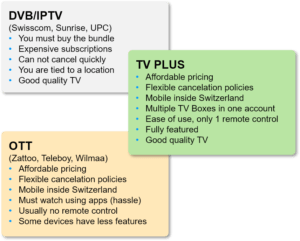
Absolutely! Competition is a good thing. Consumers have a lot of choices. Basically, there are 2 types of competitors (see the diagram below): On the one Side, there are Swisscom, UPC, Sunrise or others who use technologies such as IPTV or DVB platforms. In other words, these providers go through their own network, such as their own cable TV network or telephone connection. In Switzerland, just over 2 million households watch TV this way. In most cases, you have to sign a contract for at least 12 months and subscribe to everything (TV, Internet, telephony) from the same provider. You are bound to your location and cannot take the TV boxes with you elsewhere. You usually pay 100-140 CHF on the average. With TV PLUS you are not locally bound, can cancel monthly and it costs 24.90 CHF/Mt. for TV. You can choose a good internet provider yourself for 39-50 CHF – so you are saving 50%.

On the other side, there are Zattoo, Teleboy, Wilmaa and others, which like TV PLUS, use OTT (Over the Top) platforms. OTT basically means that these services do not need an own network or are bound to one specific Internet provider. TV PLUS is the solution for people who don’t want to deal (anymore) with app installation on devices and unfriendly operation of smart TVs. TV PLUS works very simply: switch on and watch TV on a big screen instantly. VoD, Netflix and Youtube can be operated with the same (and only necessary) remote control. Above all, we focus on uncomplicated operation. Not to forget: you can use up to 5 boxes at the same time, 4K picture quality, enjoyment on a big screen instead of a small mobile screen etc. We like to think that TV PLUS uses the best of the two worlds and combines their advantages to the benefit of the consumers.
Stripe is one of the leading Payment Service Providers in Europe and is a kind of interface between our e-shop and you as a customer. This service handles your payment through an encrypted system, so that the payment is executed problem-free and securely. The personal data is not stored at TV PLUS but encoded and stored only with Stripe.
If you are from Australia, g’day to you. No, we do not operate in Australia, but there is a separate and unrelated outfit also called TV Plus in Australia. If you have an inquiry and you are from Australia, you are probably a customer of the Australian TV plus. Please contact them at http://www.tvplus.com.au/ . Thanks for your understanding.
The app is provided by Samsung itself. Our TV PLUS TV service is not affiliated with Samsung. If you have any questions, please contact Samsung directly.
Some customers prefer to pay by invoices with payment slip. We understand that. However, with our low prices, for handling and cost reasons, we do not offer it. You can make monthly subscription payments with all major credit cards, the Postfinance Card and PayPal. If you don’t have one of those cards, there is a simple solution: you can open a PayPal account for free and pay with it. The monthly subscription is always the same, unless you subscribe to one of the language packages later. These costs will be added to the next monthly bill. Then it works like this:
  • When you order the TV PLUS Start package for the first time, select PayPal as payment method. Or you change in TV PLUS My Account from another payment method to PayPal. Your PayPal account must already be created and the required amount available in it.
  • Before the subscription runs out you make a monthly payment from your bank account to PayPal, best using a permanent order from your bank. Make sure there are enough funds in the PayPal account (this works like a bank account).
  • TV PLUS charges your PayPal account automatically. There are no additional costs for you.
  • You get a monthly payment confirmation from PayPal.
 
Sky offers 3 parts: sky Sport, sky Show and sky Store. These can be subscribed individually, and new options may be added by sky. The easiest way to find out what what is offered here. below and you can then review all the details and the current prices at sky. To enjoy sky you need a subscription from sky Switzerland, to which you can first subscribe separately on your computer or tablet. Then you only need to log in to sky once on the TV box and you will stay logged in. By the way: If you see a message “update required”, you can ignore it and continue watching without any problems.

Generelle Fragen (10)

Wie bei anderen Anbietern auch ist dies durch die Rechtslage bedingt. Wir bezahlen für die Rechte, Live-TV-Sender und VoD-Filme zu streamen und diese Rechte sind auf die Schweiz und auf Liechtenstein limitiert.
Am besten kontaktierst du deinen Anbieter und bittest um Kündigung des Internet-Abos. Meistens ist die Kündigung nach einer Nutzung von mehr als einem Jahr kein Problem. Stelle sicher, dass du die Konditionen bei der Kündigung verstehst und lies unbedingt das Kleingedruckte. Bitte beachte: Die TV PLUS Boxen funktionieren auch mit deinem aktuellen Internet-Abo. Du kannst das TV PLUS sofort bestellen und es bis zur Kündigung mit deiner aktuellen TV-Ausstattung benützen. Falls du neben dem TV PLUS Service einen neuen Internetanbieter brauchst, bitten wir einen eigenen Internetdienst an – siehe unter dem Reiter INTERNET auf unserer Website.
Absolut! Wir bezahlen die vorgeschriebenen Gebühren, um Live-TV-Kanäle und VoD-Filme zu streamen ebenso der 7-Tage-Wiederholungsfunktion und der Pausen-Funktion zu benutzen. Verständlicherweise wollen die Produzenten von TV-Inhalten und Filmen für Ihre Angebote entlohnt werden. Ihre Rechte werden durch eine Anzahl verschiedener Organisationen, an welche wir diese Gebühren entrichten, vertreten. In der Schweiz herrscht eine relativ konsumentenfreundliche Gesetzgebung, welche es erlaubt, all diese schönen Angebote zu vernünftigen Preisen anzubieten. So haben alle etwas davon.
Faustregel: es braucht 5 Mbit/s (5 Megabit pro Sekunde) Download (Herunterladen) Geschwindigkeit und sehr wenig Upload (Hochladen) Geschwindigkeit pro Box. Es ist von Nutzen, eine Reserve zu diesem Minimum hinzuzufügen. Um auf der sicheren Seite zu sein, empfehlen wir mindestens eine “30/10” Verbindung, vor allem wenn du über 2 bis 3 Boxen verfügst. Gibt dein Internetanbieter “50/50” oder “100/10” an, ist dies mehr als ausreichend, um 5 Boxen gleichzeitig in Betrieb zu haben und währenddessen im Internet zu surfen, E-Mails zu versenden und eine mittelgrosse Datei zu downloaden. Das alles geht mit demselben Internetanschluss. Anmerkung: z. B. “50/5” verweist auf 50 Mbit/s Download (Herunterladen)- und 5 Mbit/s Upload (Hochladen) Geschwindigkeit.  
Absolut! Es hat etwas in sich, in Konkurrenz zu stehen. So haben die Konsumenten eine grosse Auswahl. Grundsätzlich gibt es 2 Arten von Mitbewerbern (siehe auch Grafik links): Einerseits sind es Swisscom, UPC, Sunrise oder andere, welche Technologien wie IPTV oder DVB-Plattformen benutzen. Sprich: diese Anbieter gehen über das eigene Netz, wie z.B. eigenes Kabel-TV-Netz oder den Telefonanschluss. In der Schweiz schauen etwas über 2 Millionen Haushalte TV auf diese Weise. Meistens muss man sich für mindestens 12 Monate vertraglich binden und alles (TV, Internet, Telefonie) vom gleichen Anbieter abonnieren. Auch örtlich ist man gebunden und kann die TV Boxen nicht ohne Weiteres woanders benutzen. Dafür zahlt man in der Regel 100-140 CHF/Mt. Bei TV PLUS ist man nicht örtlich gebunden, kann monatlich kündigen und es kostet 24.90 CHF/Mt. fürs TV. Man kann einen guten Internetanbieter für 39-50 CHF selbst wählen – also kommt man auf etwa die Hälfte der Kosten.

Andererseits stehen da Zattoo, Teleboy, Wilmaa und andere, welche wie TV PLUS die OTT (Over the Top) Plattformen benutzen. OTT bedeutet, dass diese Dienste nicht über eigenes Netz gehen müssen oder an einen Internet-Anbieter gebunden sind. Die TV PLUS ist die Lösung für Leute, die sich nicht (mehr) mit App Installation auf Geräten und unfreundlicher Bedienung von Smart TVs befassen wollen. TV PLUS funktioniert sehr einfach: einschalten und TV läuft. VoD, Netflix und Youtube sind mit der gleichen (und einzig nötigen) Fernbedienung bedienbar. Wir setzen vor allem auf unkomplizierte Bedienung. Nicht zu vergessen: man kann bis zu 5 Boxen gleichzeitig benutzen, 4K Bildqualität, Surround Sound, Genuss auf grossem Bildschirm statt auf kleinem Handy-Schirm usw.
Ja. TV PLUS ist ein ausgereifter Dienst für grosse Mädchen und Jungs. Wir geben dir die Freiheit, dein Zuhause zu “entbündeln” und zu sparen. Du kannst deinen eigenen Internet-/Festnetzanbieter auswählen und viel bessere Konditionen aushandeln als mit einem Kombi-Abo. Auf unserer Website bieten wir natürlich auch Internet an – alles aus einer Hand, wenn du es möchtest.
Stripe ist einer der führenden Payment Service Providers in der Welt und ist eine Art Schnittstelle zwischen unserem E-Shop und dich als Kunden. Dieser Dienst wickelt deine Zahlung über ein verschlüsseltes System ab, damit die Zahlung problemlos und sicher ausgeführt wird. Die persönlichen Daten werden nicht bei TV PLUS sondern verschlüsselt und zertifiziert nur bei Stripe gespeichert.
Gemeint ist die TV Plus App, welche auf bestimmten Samsung TV-Modellen installiert ist.  Die App wird von Samsung selbst bereitgestellt. Unser TV PLUS TV-Service ist mit Samsung nicht verbunden. Bei Fragen dazu wende dich bitte direkt an Samsung.
Viele Kunden bevorzugen es, auf Rechnungen mit Einzahlungsschein zu bezahlen. Das verstehen wir. Bei unseren tiefen Preisen allerdings, aus Handling- und Kostengründen bieten wir es nicht an. Mit alle gängigen Kreditkarten, die Postfinance Card und PayPal kannst du monatliche Abo-Zahlungen tätigen. Falls du keine Zahlkarte hast, gibt es eine einfache Lösung: bei PayPal ganz einfach und kostenlos ein Zahlkonto eröffnen und darüber bezahlen. Der Monatsbetrag ist grundsätzlich immer gleich, ausser du abonnierst nachträglich eins der Sprachpaketen. Diese Kosten werden mit der nächsten Monatsrechnung in Rechnung gestellt. Dann sieht es so aus:
  • Bei erster Bestellung vom TV PLUS Starter Paket wählst du PayPal aus. Oder du stellst im TV PLUS Mein Konto von einer anderen Zahlart auf PayPal um. Dein PayPal Konto muss bestehen und genügend gedeckt sein.
  • Du überweist die fälligen Abogebühren jeweils monatlich und vor dem Ablauf des TV PLUS Abos von deinem Bankkonto an PayPal (das funktioniert wie eine Art Kasse).
  • TV PLUS belastet die Abogebühr automatisch an PayPal. Das geht vollautomatisch und dir entstehen keine zusätzlichen Kosten.
  • Du erhältst monatlich eine Zahlbestätigung von PayPal.
Bei Sky werden 3 Bereiche angeboten: Sky Sport, Sky Show und Sky Store. Diese können einzeln abonniert werden. Am besten sieht man hier was angeboten wird. Unten auf Preise und Details drücken und bei Sky können alle Details und die aktuellen Preise dann angeschaut werden. Um Sky zu geniessen, brauchst du ein Abo von Sky Switzerland, welches du zuerst separat auf deinem Computer oder Tablet abschliessen kannst. Anschliessend brauchst du dich nur einmal auf der TV Box bei Sky einzuloggen. Übrigens: Wenn du eine Meldung “Update erforderlich” siehst, kannst du diese ruhig ignorieren und problemlos weiterschauen.

About The TV PLUS Subscriptions (10)

You can cancel the TV PLUS subscription at any time after the first 3 months. You will still receive your subscribed Live TV channels until 1 month after your last payment. After that time, since you may keep the TV PLUS Box, you can still use the box for everything outside the TV PLUS service: e.g. YouTube, Netflix or the Media Center to play your local content.
You need to log into your account by going to https://tv-plus.tv/my-account/. There you can
  • add one or more language packs
  • cancel one or more language packs
  • cancel your TV PLUS subscription.
You can also order additional TV PLUS boxes there.
Yes, you can add one or more language pack(s) at any time or cancel monthly.
Yes. TV PLUS is a sophisticated service for big girls and boys. We give you the freedom to “unbundle” your home and save. You can choose your own internet/land line provider and negotiate much better terms than with a combo subscription. Of course, we also offer our own Internet service – everything in a one-stop-shop, if you wish.
We intended to offer a very balanced range of channel lineup covering the whole of Switzerland. TV Plus offers over 90 German language channels, over 33 Italian language channels and 34 French language channels from Switzerland, Italy and France. For our many English-speaking customers in Switzerland, we offer 35 English-language channels (5 in the Starter package and 30 in the English-language package for CHF 7.50/month). On the top of this, we offer over 40 full HD sports and premium channels provided by sky Sports and sky Show packages. If we do not offer certain channels you want, please contact us via Live Chat (Bubble in the right bottom corner). We are always working to acquire the channels that are most requested by users.
In the current TV PLUS offering you have 2 ways of enjoying VoD:
  1. The sky services: you need to open a sky account if you don’t already have one, best done on your computer. Then you log in once on the TV box and you are ready to watch sky. You pay via your sky account which is separate from TV PLUS.
  2. Netflix: you need to open a Netflix account if you don’t already have one, best done on your computer. Then you log in once on the TV box and you are ready to watch Netflix. You pay via your Netflix account which is separate from TV PLUS. You are paying a flat rate subscription and you can watch as much as you want according to the current business model of Netflix. You can cancel Netflix monthly.
The 5 TV boxes sharing one TV PLUS account can be in completely different locations and can watch TV at the same time independently of each other. It is not necessary that the boxes are connected to the same Internet provider. Only the recordings on all TV boxes are shared, i.e. you can record a show from the box in your living room and then watch it on another box e.g. in your weekend house in the Tessin (or in any of our mobile and Web apps).
The recording capacity is limited to approximately 400 hours. With assorted movies and sports recordings this can easily mean 250 to 350 recordings. We have about 12’000 boxes operating with this concept and we have no knowledge about any user who has reached their limit. If needed, we can increase the limit later. Just for clarity: all recordings are stored in the cloud, not on the TV Box.
According to the current licensing regulation, we are not allowed to make Replay available or to have recordings made from the time before the account was opened. After one day, Replay and recordings from the last 24 hours are available. 7 days after opening the account, the current maximum of 7 days for Replay and recordings is available for you.

The TV PLUS Lite subscription offers no replay/recording/pause functionality and no mobile or web TV apps. It is aimed at customers who only watch TV occasionally. You can switch Subscriptions as follows:

– from Lite to Classic: at any time, billed from the next first of the month, replay/recording/pause functionality and mobile and web TV apps are activated immediately

– from Classic to Lite: this switch is only possible after a minimum term of 3 months of using the Classic subscription. replay/recording/pause functionality and mobile and web TV apps remain active from the date of switching until the end of the current month, the Lite price will be charged from the first of the next month

Best is to go to your account at https://tv-plus.tv/my-account/subscriptions and check what options you currently have available.

Über die TV PLUS Abos (10)

TV PLUS-Abo kannst du jederzeit nach Ablauf der ersten 3 Monate kündigen. Gemäss Abo erhältst du Live TV-Kanäle bis 1 Monat nach deiner letzten Zahlung. Du behältst deine TV PLUS Box danach und kannst die auch für Funktionen ausserhalb von TV PLUS benutzen: z. B. YouTube, Netflix oder das Media Center oder um lokale Inhalte abzurufen.
Melde dich unter https://tv-plus.tv/my-account/ in deinem Benutzerkonto an. Dort kannst du:
  • ein oder mehrere Sprachpaket(e) hinzufügen
  • ein oder mehrere Sprachpaket(e) kündigen
  • dein TV PLUS-Abo kündigen
  • zusätzliche TV PLUS Boxen bestellen
Ja, du kannst jederzeit ein oder mehrere Sprachpaket(e) hinzufügen oder monatlich kündigen.
Ja. TV PLUS ist ein ausgereifter Dienst für grosse Mädchen und Jungs. Wir geben dir die Freiheit, dein Zuhause zu “entbündeln” und zu sparen. Du kannst deinen eigenen Internet-/Festnetzanbieter auswählen und viel bessere Konditionen aushandeln als mit einem Kombi-Abo. Auf unserer Website bieten wir natürlich auch Internet an – alles aus einer Hand, wenn du es möchtest.
Wir beabsichtigten ein sehr ausgewogenes Angebot an Sendern, welches die ganze Schweiz abdeckt, anzubieten. TV Plus bietet über 90 deutschsprachigen, über 33 italienischsprachigen und 34 französischsprachige Kanäle aus der Schweiz, Italien und Frankreich. Für unsere vielen Englischsprechenden Kunden in der Schweiz bieten wir 35 englischsprachige Kanäle (5 im Starterpaket und 30 im englischen Sprachpaket für 7.50 CHF/Mt.). Darüber hinaus bieten wir über Sky Sports und Sky Show Pakete über 40 Full HD Sport und Premiumsender an. Bieten wir gewisse von dir gewünschte Kanäle nicht, kontaktiere uns bitte über Live Chat (Bubble rechts unten). Wir arbeiten immer daran, die Kanäle zu erwerben, welche von den Benutzern am meisten nachgefragt werden.
Im heutigen Ausbau hast du zwei Möglichkeiten, die VoD Dienstleistung zu geniessen:
  1. Die Sky VoD Dienstleistung: bei Sky musst du ein Sky Konto selbst einrichten oder du hast bereits ein Konto. Dann einmal auf der Box anmelden und schon läuft Sky. Die Bezahlung erfolgt über dein separates Sky Abo.
  2. Netflix: bei Netflix musst du ein Netflix Konto selbst einrichten oder du hast bereits ein Konto. Dann einmal auf der Box anmelden und schon läuft Netflix. Die Bezahlung erfolgt über dein separates Netflix Abo. Netflix kannst du monatlich kündigen.
Die 5 TV Boxen, welche sich ein TV PLUS Konto teilen können in ganz verschiedenen Standorten sein und es kann gleichzeitig unabhängig voneinander TV angeschaut werden. Es ist nicht nötig, dass die Boxen über den gleichen Internetprovider angeschlossen sind. Lediglich, werden die Aufnahmen auf allen TV Boxen geteilt, d. h. du kannst ein Programm über die Box in deinem Wohnzimmer aufnehmen und dann in deinem Ferienhaus im Tessin auf einer anderen Box im gleichen Konto schauen.
Wir bieten ein Soft-Limit von 400 Stunden an. Bei einer Mischung aus Nachrichten, Filmen und Sportsendungen können das gut und gerne 250-350 Aufnahmen bedeuten. Mit diesem Konzept sind ca. 12’000 Boxen in Betrieb und bis jetzt ist uns kein Benutzer bekannt, der effektiv die Grenze erreicht hat. Wenn wir feststellen, dass nun viele Benutzer an die Grenzen kommen, können wir die Limite später erhöhen. Wichtig: deine Aufnahmen werden in der Cloud und nicht auf der TV Box gespeichert.
Wir dürfen gemäss der aktuellen Lizenz kein Replay verfügbar machen und keine Aufnahmen machen, lassen welche aus der Zeit vor der Eröffnung des Kontos stammen. Nach einem Tag stehen schon Replay und Aufnahmen der letzten 24h zur Verfügung. 7 Tage nach Kontoeröffnung steht das aktuelle Maximum von 7 Tagen für Replay und Aufnahmen für dich bereit.

Das neue TV PLUS Lite Abo bietet keine Replay/Recording/Pause Funktionalität und keine Mobile oder Web TV Apps an und richtet sich an Kunden, die nur gelegentlich TV schauen.

– von Lite zu Classic: jederzeit, Verrechnung erfolgt ab nächstem Ersten im Monat, Replay/Recording/Pause Funktionalität und die Mobile und Web TV Apps werden aber sofort freigeschaltet

– von Classic zu Lite: dieser Wechsel ist jeweils nur nach einer Mindestlaufzeit von 3 Monaten des Classic Abos möglich. Replay/Recording/Pause Funktionalität und die Mobile und Web TV Apps bleiben ab Wechsel bis Ende des laufenden Monats aktiv, Verrechnung zum Lite-Preis erfolgt ab nächstem Ersten im Monat

Gehe am besten zu deinem Konto unter https://tv-plus.tv/my-account/subscriptions und überprüfe, welche Optionen derzeit zur Verfügung stehen.

The TV PLUS Box (16)

First, you only pay for the LIVE TV subscription once, but you can use up to 5 boxes at the same time for that price. Second, you can have one box in your living room, one in the bedroom and one in your weekend home. So, you can enjoy the whole content yourself, wherever you are. Third, you can have one box for yourself, one for your spouse(s), and one for your kids and all of them can watch a different TV show at the same time. You just need to have “enough” internet to watch TV on multiple boxes at the same time. The rule of thumb is: 5Mbit/s (megabits per second) per box. And finally, if you order a movie or record a TV show, all your boxes have access to it. In other words, you can start watching something in the living room and continue tomorrow morning in your study or on Sunday in your weekend home.
Anywhere, if you have cables long enough to connect the box to the TV and Internet. TV box must be visible (or at least the infrared receiver window on the front) because the remote control works with infrared signals. With newer TV boxes with the designation “TIPc8x” on the bottom, the remote control also works with Bluetooth; this means that the TV box can also be hidden (e.g. in a sideboard).
You should not need to. In the carton you will get the following:
  • a 3-meter Ethernet cable for the Internet
  • a 2.5-meter HDMI cable for your TV
  • the power supply
  • the remote control with batteries
  • a quick start guide to help you connect everything
This should be enough to start you off immediately.
No. The box comes to you already enabled. Just connect it and enjoy. No password is needed for the TV PLUS services. The only exceptions are Netflix and sky App. To use them, you need to already have a Netflix or sky account or open a new one. On the TV box, you`ll need to enter your Netflix or sky username and password once, and the box will always keep you logged on.

Our remote control has 4 green programmable buttons on the top right (Power, Source, VOL+ and VOL-), you can learn them from 4 most important buttons of your existing TV remote control. In this way you only need one single remote control to operate both- your TV box and TV.

And this is how it works: First you need to determine the type of your TV PLUS remote. Briefly press the OK button and observe the Power button on the top right. If the button flashes red, then follow these steps:
  1. Press and hold one of the green buttons (e.g. VOL+) for about 6 seconds until the LED light of the green power button (it flashes 3 times briefly at the beginning) is permanently lit.
  2. Hold your original TV remote control and your new TV Plus remote control about 1 cm away from each other, opposite to each other (with the front sides facing each other)
  3.  Press and hold the corresponding button on your original TV remote control (e.g. VOL+) until the LED light on the new TV Plus remote control flashes 3 times and then goes out.
  4. Do the same for the other three buttons (Power, Source and VOL-).
If the button flashes green, then follow these steps:
  1. Press and hold both green VOL+ and VOL- buttons until the red LED light stays on, the remote is now in the learning mode
  2. Press on the button you wish to learn (e.g. Source) until the red LED flashes
  3. Place your original TV remote to point to the new TV PLUS remote. Make sure you keep the fronts of the two remotes opposite to each other within 1 cm.
  4. Press and hold the corresponding button (e.g. Source) on your original TV remote. The red LED light on the new TV PLUS remote will blink three times and then stay on to indicate that the learning was successful.
  5. Repeat the process for the remaining three learning buttons on your new TV PLUS remote.
  6. Press both green VOL+ and VOL- buttons again to exit the learning mode.

Of course, there are more manuals. We are constantly adding new features and because we want to do something good for the environment, we prefer online manuals. These are always up to date. You can also download the manuals as PDF. We provide the manuals on the website inside your account under DOWNLOADS, but we hope that using the TV Box is so easy for you that you don’t need any manual at all.  
We make software updates available to you free of charge. The TV box constantly checks for new updates in the background but will never interrupt you with notifications or start an update out of the blue. You may notice a massage only when you connect the box with the power cable (also known as cold start), or when you go to Settings, but you can skip this message. The TV box will then download the update in the background and complete it when you go into standby mode. If you prefer to do an update manually, the download takes about a minute on a 50 Mbit/s connection and the update itself takes less than a minute.
The TV PLUS box is fully compliant with the current CH and EU energy efficiency norms. It uses about 4W in full operation and around 0.5W in standby mode. If you are not using the box for about 3h it will automatically go to standby to conserve energy and your Internet bandwidth. To wake up from standby, the box typically needs about 4 seconds after you press the power button. Incidentally, the cold boot (when you connect the power cable) takes 30-40 seconds, so that’s fast too.
We currently have about 90 HD (high-definition) channels. The quality is excellent due to the careful selection of technologies used. The SD (standard definition) channels are similar in quality to a good DVD. 4K (UHD) quality is currently available for select Netflix and Youtube content. Unfortunately, the TV industry is not producing a lot in 4K due to its high cost, but that will come.
Yes, and it can be used in an “emergency”. But we don’t recommend using Wi-Fi for TV. For small screens on mobile devices, it’s fine to use Wi-Fi because they don’t have as much screen real estate. Because of the very high resolution demands of modern TVs, using Wi-Fi in conjunction with a 50-inch screen can result in poor picture quality at times. Mostly it depends on your installation, distance from the Wi-Fi station, presence of metal objects, etc. In any case, we recommend an Internet cable connection with an Ethernet cable (also known as RJ45). If it is not possible for you to pull an Ethernet cable to the TV box location, we recommend using so-called powerline plugs. These are inexpensive, easy to use (just plug them into the wall socket) and require no configuration or maintenance. Powerline devices use the electrical wiring in your home to transport the Internet signal from the router/modem to the TV PLUS Box location. These are made by Devolo, Fritz!, Netgear, Zyxel and many others and are readily available in stores and online. Learn more
Both. For streaming from your local network, you need to have a DLNA (or also called UPnP) share server set up. Most NAS devices have such a server built in and only need to be activated. Every PC or MAC also has sharing possibilities. Whit e.g. Windows 10 as follows:
  • press the Windows button
  • Search for “Media Streaming Options” and click the result to open Control Panel on that section
  • Click the Turn on media streaming button to enable DLNA on Windows 10. Turn on media streaming on Windows 10.
  • Click OK to apply the settings and complete the task
It is easy: activate sharing on your PC or NAS, press the Media button on the TV PLUS remote control and wait a bit. All DLNA servers on your network will be automatically scanned and shown. You can also consult the Internet about DLNA, there are many articles covering that topic. You can also play music, videos and photos from a USB stick. Just plug it into the box, press the Media button on the TV PLUS remote control and select the USB drive.
Basically yes. The Harmony model or any other “learning” remote control must be able to learn our infrared (IR) codes, see link: https://support.myharmony.com/en-ch/adding-a-device-thats-not-found-in-the-harmony-database
The TV programs are only available in stereo from our sources. This will not change in the near future, although we are always talking to our suppliers about this. The same is true with Youtube content. On the other hand, the MyMedia app and possibly Netflix support multi-channel sound. In order to use it, you need to connect an appropriate decoder to the output of the TV Box. Either use the new feature of the quick menu (in software versions from August2021 using the green button) or go to Settings / Sounds / Digital sounds to set automatic passthrough detection mode to ON. You may need to experiment with the settings for a while to find a mode that is appropriate for your system.
Of course, it is possible to watch already started programs from the beginning. Press the Guide button while a program is running, and the program is automatically highlighted. Press OK once and you will see the “Details” of the program. Press OK again, then you will be asked if you want to watch “live” or the current program from “beginning”. Now select the desired option by pressing the arrow key. Press OK to finish the process. For programs that are completely in the past: also open the EPG and select the desired program (if necessary, you can select the corresponding day with the green button). Press the OK button once, the “Details” of the program will appear. In this view you have the choice between “Watch now” or “Record” in the upper right corner. Press OK to select “Watch now” and the program will be played from the beginning. You can also use the blue REW button to find the beginning of a program. But using the GUIDE is faster.
The Yallo Box uses 3G or 4G mobile phone technology to access the Internet and is basically a “hot spot” device. The TV Box can be connected to the existing Ethernet (LAN) socket – it only works if you set the “LAN only” setting on the Yallo Box under Settings / Ethernet / Ethernet settings. As with any mobile, the 3G/4G reception in your location may be good or bad and may vary considerably over time. In addition, this technology involves “shared access,” the actual speed of the mobile Internet for home use depends on how many devices are connected to the same radio cell. We do not encourage using the Yallo solution. The TV streaming requires an Internet access that is fast enough and is continuously able to deliver the requested performance. We normally state that the TV Box needs an Internet access capable of providing 30 Mbit/s and experience has shown that hot spot solutions may not be able to reliably deliver that performance.
Generally: Since the duration of the programs can vary on short notice or programs can be postponed in the last minute, ALL recordings are always automatically recorded with 5 minutes advance and run 15 minutes longer that the actual program. E.g. the episode of “Doktor Ballouz” on ZDF runs from 8:15 p.m. to 9:00 p.m. (45 minutes), but the recording runs from 8:10 p.m. to 9:15 p.m., i.e. 65 minutes. This means that each recording has a total of 20 minutes reserve to compensate for such program changes.

Die TV PLUS Box (16)

Erstens bezahlst du nur einmal für das LIVE TV-Abo, kannst aber bis zu 5 Boxen gleichzeitig nutzen zu diesem Preis. Zweitens kannst du eine Box im Wohnzimmer, eine im Schlafzimmer und eine in deinem Wochenendhaus haben. So kannst du jederzeit die gesamten Inhalte geniessen, wo auch immer du gerade bist. Drittens kannst du eine Box für sich, eine für deine(n) Ehepartner(in) und eine für deine Kinder haben und alle können gleichzeitig eine andere TV-Sendung anschauen. Du benötigst lediglich “ausreichend” Internet, um gleichzeitig auf verschiedenen Boxen fernsehen zu können. Faustregel: 5Mbit/s (Megabit pro Sekunde) pro Box. Und zu guter Letzt, wenn du einen Film bestellst oder eine TV-Sendung aufzeichnest, haben alle deine Boxen Zugriff darauf. Anders gesagt, kannst du im Wohnzimmer beginnen etwas zu schauen und am nächsten Morgen im Arbeitszimmer oder am Sonntag in deinem Wochenendhaus fortfahren.
Überall, sofern du Kabel hast, die lang genug sind, um die Box mit dem TV- und Internetanschluss zu verbinden. TV Box muss sichtbar sein (oder zumindest das Infrarot-Empfangsfenster auf der Vorderseite), weil die Fernbedienung mit einem Infrarot-Signal funktioniert. Bei neueren TV Boxen mit der Bezeichnung “TIPc8x” auf der Unterseite funktioniert die Fernbedienung auch mit Bluetooth; somit kann die TV Box auch versteckt (z.B. in einem Sideboard) platziert werden.
In der Regel nicht. Im Lieferungsumfang befindet sich folgendes:
  • ein 3-Meter Ethernet Kabel für das Internet
  • ein 2.5-Meter HDMI Kabel für dein TV
  • das Netzgerät
  • die Fernbedienung inkl. Batterien
  • eine Schnellstart-Bedienungsanleitung
 
Nein. Du erhältst die Box schon einsatzbereit. Lediglich musst du sie verbinden und anschliessend geniessen. Es ist kein Passwort für die TV PLUS Dienste nötig. Die einzige Ausnahme betrifft die Netflix und die Sky Apps. Um diese zu benutzen, musst du bereits über einen Netflix- oder Sky-Account verfügen oder einen neuen eröffnen. Auf der TV Box musst du anschliessend einmalig dein Netflix- oder Sky Passwort eingeben und bist danach für immer angemeldet.

Unsere Fernbedienung hat 4 programmierbare Tasten oben rechts (Power, Source, VOL+ und VOL-), die kannst du mit den wichtigsten Tasten deiner ursprünglichen Fernbedienung belegen. Danach brauchst nur noch eine Fernbedienung, mit der du sowohl deine TV Box als auch deinen Fernseher bedienen kannst.

Und so geht`s: Ermittle zuerst den Typ der TV PLUS Fernbedienung, indem du einmal die OK-Taste drückst. Leuchtet die Power-Taste oben rechts rot, dann:
  1. Drücke ca. 6 Sek. auf eine der grünen Tasten (z. B. VOL+), bis das LED-Lämpchen der grünen Power Taste (sie blinkt anfangs 3 mal kurz auf) dauerhaft rot leuchtet.
  2. Halte deine alte Fernbedienung und deine neue TV Plus-Fernbedienung in ca. 1 cm Abstand voneinander entfernt gegenüber (jeweils mit den Vorderseiten).
  3. Halte die entsprechende Taste deiner ursprünglichen TV-Fernbedienung (z. B. VOL+) so lange gedrückt, bis das rote LED-Lämpchen auf der neuen TV Plus-Fernbedienung 3 mal blinkt und anschliessend erlischt.
  4. Gehe genau so vor für die anderen drei Tasten (Power, Source und VOL-)
Leuchtet die Power-Taste oben rechts grün, dann:
  1. Drücke die grünen Tasten VOL+ und VOL- (oben rechts) gleichzeitig, bis die rote LED leuchtet. Die Fernbedienung befindet sich jetzt im Lernmodus.
  2. Drücke die Taste, die du anlernen möchtest (z. B. Source), bis die rote LED blinkt.
  3. Halte deine ursprüngliche Fernbedienung und deine neue TV Plus-Fernbedienung in ca. 1 cm Abstand voneinander entfernt gegenüber (jeweils mit den Vorderseiten).
  4. Halte die entsprechende Taste deiner ursprünglichen TV-Fernbedienung (z.B. Source) so lange gedrückt, bis das rote LED-Lämpchen auf der neuen TV PLUS-Fernbedienung 3 Mal blinkt und anschliessend dauerhaft leuchtet. Der Lernvorgang war erfolgreich.
  5. Gehe genau so vor für die anderen drei Tasten (Power, Source und VOL-)
  6. Drücke die grünen VOL+ und VOL- Tasten nochmals gleichzeitig, um den Lernmodus zu verlassen.
 
Natürlich gibt es weitere Anleitungen. Da wir ständig neue Funktionen hinzufügen und die Umwelt etwas Gutes tun möchten, bevorzugen wir Online-Anleitungen. Diese sind immer auf dem neuesten Stand. Du kannst die Anleitungen auch als PDF herunterladen. Wir stellen die Anleitungen auf der Webseite unter Support zur Verfügung aber hoffen, dass die Benutzung der TV Box für dich so einfach ist, dass du gar keine Anleitung benötigst.
Software-Updates (Aktualisierungen) werden kostenlos zur Verfügung gestellt. Die TV-Box prüft ständig im Hintergrund ob neuen Updates (Aktualisierungen) vorhanden sind, wird dich aber nie mit Mitteilungen unterbrechen oder ein Update (Aktualisierung) aus heiterem Himmel starten. Du bemerkst eine Mitteilung nur, wenn du die Box mit dem Stromkabel anschliesst (auch bekannt als Kaltstart), aber du kannst diese Mitteilung überspringen. Die TV Box wird dann im Hintergrund das Update (Aktualisierung) herunterladen und dieses vollziehen, wenn du in den Standby-Modus gehst. Willst du den Download (Herunterladen) manuell durchführen, benötigt der Download ungefähr 1 Minute bei einer 50Mbit/s-Verbindung. Das Update (Aktualisierung) selbst bedarf anschliessend weniger als eine Minute.
Die TV PLUS Box ist konform mit den aktuellen CH und EU-Energieeffizienz Normen. Sie benötigt 4W im Einsatzmodus und 0.5W im Standby-Modus. Wird die Box für 3 Stunden nicht benutzt, schaltet sie automatisch in den Standby-Modus, um Energie und Internet Bandbreite zu sparen. Um den Standby-Modus zu verlassen, benötigt die Box typischerweise 4 Sekunden, nachdem du den Power-Knopf drückst. Im Übrigen benötigt der Kaltstart (wenn du das Stromkabel verbindest) 30 bis 40 Sekunden.
Momentan verfügen wir über 75 HD-Kanäle (High-Definition = hohe Auflösung). Aufgrund der sorgfältig ausgesuchten Technologien, die wir benutzen, ist die Qualität ausgezeichnet. Die übrigen Kanäle sind SD-Kanäle (Standard-Definition = Standardauflösung) und sind in der Qualität vergleichbar mit einer guten DVD-Qualität. 4K (UHD) ist momentan für Netflix und YouTube Inhalte verfügbar. Aufgrund der hohen Kosten produzieren die TV-Hersteller leider nicht viele 4K-Sendungen. Aber dies wird noch kommen.
Ja, und es kann in Notsituationen benutzt werden. Aber wir raten von der Wi-Fi Nutzung für TV ab. Für kleine Bildschirme der mobilen Geräte ist es in Ordnung, Wi-Fi zu benutzen da sie nicht so viel Bildfläche haben. Wegen den sehr hohen Leistungsansprüchen kann es bei Wi-Fi Nutzung in Verbindung mit einem 50-Zoll-Bildschirm zeitweise zu einer schlechten Bildqualität kommen. Meist ist es abhängig von deiner Installation, der Distanz zur Wi-Fi Station, Präsenz von Metallobjekten etc. Wir empfehlen auf jeden Fall eine Internet-Kabelverbindung mit einem Ethernet-Kabel (auch bekannt als RJ45). Wenn es dir nicht möglich ist, ein Ethernet-Kabel zum Standort der TV Box zu ziehen, empfehlen wir die Nutzung von sogenannten Powerline-Steckern. Diese sind günstig, einfach zu handhaben (nur mit der Steckdose verbinden) und müssen weder konfiguriert noch gewartet werden. Powerline-Geräte nutzen die elektrische Verdrahtung in deinem Zuhause für den Transport des Internetsignals vom Router/Modem zum Standort der TV PLUS Box. Diese werden von Devolo, Fritz!, Netgear, Zyxel und vielen anderen hergestellt und sind in Geschäften und Onlineshops gut verfügbar. Mehr erfahren
Sowohl als auch. Damit der Netzwerkzugriff geht, musst du einen sogenannten DLNA (oder auch UPnP genannt) Share Server haben. Die meisten NAS Geräte haben diese eingebaut und müssen nur aktiviert werden, und jeder PC oder MAC kann auch über Sharing seine Dateien zum Streaming anbieten. Das funktioniert z.B. bei Windows 10 folgend:
  • die Windows-Taste drücken
  • “Aktivierungsmöglichkeit des Medienstreamings” eintippen
  • Medienstreaming aktivieren
Also: Sharing aktivieren, auf der TV PLUS Fernbedienung die Media-Taste drücken und ein bisschen warten. Alle im Netzwerk befindlichen DLNA Shares werden automatisch erkannt. Du kannst auch von einem USB-Stick Musik, Videos und Fotos abspielen. Einfach einstecken und die Media-Taste drücken, dann auf den USB-Stick klicken.
Grundsätzlich ja. Das Harmony Modell oder auch jede andere “lernfähige” Fernbedienung muss unsere Infrarot-Codes (IR) lernen können, siehe link: https://support.myharmony.com/de-ch/adding-a-device-thats-not-found-in-the-harmony-database
Die TV-Sendungen sind schon bei den Quellen alle in Stereo. Wir schauen bereits seit einer Weile, ob sich da etwas machen lässt. Das Gleiche ist bei YouTube der Fall. Die MyMedia Applikation und Netflix hingegen unterstützen Mehrkanal-Ton. Dazu wird ein entsprechender Decoder an den Ausgang der Box angeschlossen. Die Einstellung nimmt man dann entweder während die Lautstärke-Grafik auf dem Bildschirm mit der UNTEN-Taste vor, oder in den Einstellungen/Töne/Digitale Töne den Automatischen Erkennungs-Modus ON wählen. Je nach Audio-System muss man eventuell noch mit den Einstellungen experimentieren.
Natürlich besteht die Möglichkeit bereits gestartete Sendungen von Anfang anzuschauen. Bei einer laufenden Sendung auf die Guide Taste drücken und die Sendung wird automatisch markiert. Einmal OK drücken und du siehst die “Details” der Sendung. Nochmals OK drücken, dann wirst du gefragt, ob du “live” oder die laufende Sendung von “Anfang” anschauen möchtest. Nun wählst du mittels Pfeiltaste die gewünschte Option. Mit OK den Vorgang abschliessen. Bei Sendungen, welche ganz in der Vergangenheit liegen: ebenfalls EPG aufrufen und die gewünschte Sendung auswählen (falls nötig, kannst du mit der grünen Taste den entsprechenden Tag auswählen). Einmal die Taste OK drücken, die “Details” zur Sendung erscheinen. In dieser Ansicht hast du oben rechts die Wahl zwischen “Jetzt anschauen” oder “Aufnehmen”. Mit OK wählst du “Jetzt anschauen” und die Sendung wird von Anfang an abgespielt. Du kannst auch die blaue REW-Taste benutzen, um den Anfang einer Sendung zu finden. Die Benutzung des GUIDE ist aber schneller.
Die Yallo Box benutzt das 3G oder 4G Mobilnetz, um auf das Internet zuzugreifen. Sie ist im Grunde ein “Hot Spot”. Die TV Box kann man an das vorhandene Ethernet (LAN) Buchse anschliessen – es funktioniert aber nur wenn man auf der Yallo Box bei Einstellungen/Ethernet/Ethernet-Einstellungen die “Nur LAN” Einstellung setzt. Wie bei jedem Handy ist der Empfang sehr von der Position und der Belastung durch andere Benutzer abhängig und kann gut oder aber auch schlecht sein. Der Empfang kann auch stark mit der Zeit variieren. Wir empfehlen die Benutzung der Yallo Box nicht. Das TV-Streaming benötigt eine schnelle und stabile Verbindung. Wir empfehlen für den TV-Empfang eine stabile Internetverbindung mit mindestens 30Mbit/s. Unsere Erfahrung zeigt, dass die Hot Spot Lösungen oft diese Anforderung dauerhaft nicht erfüllen.
Generell gilt: Da die Dauer der Sendungen kurzfristig variieren kann oder Sendungen in der letzten Minute verschoben werden, werden ALLE Aufnahmen immer automatisch mit 5 Minuten Vorlauf und 15 Minuten Nachlauf aufgenommen. Z. B. die Episode von “Doktor Ballouz” auf ZDF geht von 20:15 bis 21:00 (45 Minuten), die Aufnahme geht aber von 20:10 bis 21:15, also 65 Minuten. Somit hat jede Aufnahme insgesamt 20 Minuten Reserve, um solchen Programm-Änderungen vorzubeugen.

Internet by TV PLUS (5)

The simplest way is to contact your old service provider and ask them for the conditions of canceling. In most cases, cancellation is not a problem after more than one year of use. Make sure you understand the terms and conditions of the cancellation and read the “small print”. Please note: the TV PLUS boxes also work with your current Internet subscription. So, you can already order the TV PLUS service and use it with your current Internet account until you cancel without having to pay a cancellation fee. In addition to the TV PLUS service, TV PLUS also offers our own Internet Service- see the INTERNET tab on our website.
The rule of thumb is: 5 Mbps (5 megabits per second) download speed and very little upload speed per box. It is useful to add a reserve to this minimum. To be on the safe side, we recommend at least a “30/10” connection, especially if you have 2 to 3 boxes. If your Internet Provider specifies “50/50” or “100/10”, this is more than enough to have 5 boxes running at the same time and surfing the Web, sending emails and download a moderate sized file at the same time. All this can be done with the same Internet access. Note: e.g. “50/5” refers to 50 Mbit/s download and 5 Mbit/s upload speed.  
Yes, and it can be used in an “emergency”. But we don’t recommend using Wi-Fi for TV. For small screens on mobile devices, it’s fine to use Wi-Fi because they don’t have as much screen real estate. Because of the very high resolution demands of modern TVs, using Wi-Fi in conjunction with a 50-inch screen can result in poor picture quality at times. Mostly it depends on your installation, distance from the Wi-Fi station, presence of metal objects, etc. In any case, we recommend an Internet cable connection with an Ethernet cable (also known as RJ45). If it is not possible for you to pull an Ethernet cable to the TV box location, we recommend using so-called powerline plugs. These are inexpensive, easy to use (just plug them into the wall socket) and require no configuration or maintenance. Powerline devices use the electrical wiring in your home to transport the Internet signal from the router/modem to the TV PLUS Box location. These are made by Devolo, Fritz!, Netgear, Zyxel and many others and are readily available in stores and online. Learn more
The Internet packages are designated by their speed, e.g. “Internet Package VDSL 100”. This package allows the top download speed of 100Mbit/s (Download means getting data from the Internet to my device) and upload speed of 20Mbit/s (Upload means getting data from my device to the Internet).

The address checker might deliver a result such as this:

Max Download speed: 40 Mbit/s
Max Upload speed: 16 Mbit/s

This is the actual technically feasible speed at your location.

Both the “Internet Package VDSL 100” and the “Internet Package VDSL 50” would work at this location. But with the “Internet Package VDSL 50” you would have the Upload speed of 40Mbit/s, but only the Upload speed of 10Mbit/s instead of the maximally possible 16Mbit/s.
When you order your Internet-Router we also propose to order the Router Configuration Service. Your router will be shipped to you already pre-configured and ready to connect to your new Internet account. For the brave: if you do not order the Router Configuration Service, you will have to configure your router by yourself…

Internet von TV PLUS (5)

Am besten kontaktierst du deinen Anbieter und bittest um Kündigung des Internet-Abos. Meistens ist die Kündigung nach einer Nutzung von mehr als einem Jahr kein Problem. Stelle sicher, dass du die Konditionen bei der Kündigung verstehst und lies unbedingt das Kleingedruckte. Bitte beachte: Die TV PLUS Boxen funktionieren auch mit deinem aktuellen Internet-Abo. Du kannst das TV PLUS sofort bestellen und es bis zur Kündigung mit deiner aktuellen TV-Ausstattung benützen. Falls du neben dem TV PLUS Service einen neuen Internetanbieter brauchst, bitten wir einen eigenen Internetdienst an – siehe unter dem Reiter INTERNET auf unserer Website.
Faustregel: es braucht 5 Mbit/s (5 Megabit pro Sekunde) Download (Herunterladen) Geschwindigkeit und sehr wenig Upload (Hochladen) Geschwindigkeit pro Box. Es ist von Nutzen, eine Reserve zu diesem Minimum hinzuzufügen. Um auf der sicheren Seite zu sein, empfehlen wir mindestens eine “30/10” Verbindung, vor allem wenn du über 2 bis 3 Boxen verfügst. Gibt dein Internetanbieter “50/50” oder “100/10” an, ist dies mehr als ausreichend, um 5 Boxen gleichzeitig in Betrieb zu haben und währenddessen im Internet zu surfen, E-Mails zu versenden und eine mittelgrosse Datei zu downloaden. Das alles geht mit demselben Internetanschluss. Anmerkung: z. B. “50/5” verweist auf 50 Mbit/s Download (Herunterladen)- und 5 Mbit/s Upload (Hochladen) Geschwindigkeit.  
Ja, und es kann in Notsituationen benutzt werden. Aber wir raten von der Wi-Fi Nutzung für TV ab. Für kleine Bildschirme der mobilen Geräte ist es in Ordnung, Wi-Fi zu benutzen da sie nicht so viel Bildfläche haben. Wegen den sehr hohen Leistungsansprüchen kann es bei Wi-Fi Nutzung in Verbindung mit einem 50-Zoll-Bildschirm zeitweise zu einer schlechten Bildqualität kommen. Meist ist es abhängig von deiner Installation, der Distanz zur Wi-Fi Station, Präsenz von Metallobjekten etc. Wir empfehlen auf jeden Fall eine Internet-Kabelverbindung mit einem Ethernet-Kabel (auch bekannt als RJ45). Wenn es dir nicht möglich ist, ein Ethernet-Kabel zum Standort der TV Box zu ziehen, empfehlen wir die Nutzung von sogenannten Powerline-Steckern. Diese sind günstig, einfach zu handhaben (nur mit der Steckdose verbinden) und müssen weder konfiguriert noch gewartet werden. Powerline-Geräte nutzen die elektrische Verdrahtung in deinem Zuhause für den Transport des Internetsignals vom Router/Modem zum Standort der TV PLUS Box. Diese werden von Devolo, Fritz!, Netgear, Zyxel und vielen anderen hergestellt und sind in Geschäften und Onlineshops gut verfügbar. Mehr erfahren
Die Internetpakete sind mit einer obersten Speed-Angabe bezeichnet, z. B. “Internet Paket VDSL 100”. Dieses Paket ermöglicht beispielsweise den höchsten Download (Herunterladen von Daten) Geschwindigkeit von 100Mbit/s und höchsten Upload (Hochladen von Daten) Geschwindigkeit von 20Mbit/s. Es kann aber sein, dass die Adressen-Prüfung eine Angabe wie diese liefert: Max Download (Herunterladen) Geschwindigkeit: 40 Mbit/s Max Upload (Hochladen) Geschwindigkeit: 16 Mbit/s Diese ist die technisch maximal mögliche Geschwindigkeit am gewählten Standort. Dazu passt das Paket “Internet Paket VDSL 100” und “Internet Paket VDSL 50”. Beim “Internet Paket VDSL 50” hättest du zwar den Download (Herunterladen) Geschwindigkeit von 40Mbit/s aber nur den Upload (Hochladen) Geschwindigkeit von 10Mbit/s statt den möglichen 16Mbit/s.
Beim Kauf des Internet-Routers wird die Router-Vorkonfiguration angeboten. Dein Router wird damit bereits vorkonfiguriert versendet und kann sofort die Verbindung zu deinem neuen Internetkonto herstellen.

Für die Mutigen: Falls die Router-Vorkonfiguration nicht mitbestellt wird, musst du die Konfiguration selber vornehmen…

The Apps (3)

After you have installed the mobile App on your phone or tablet, you need to log in. To log in for the first time, please go to “Settings” on your TV box and select the “App Token” option. Then enter the corresponding token into the App. Done. On the Web TV App, you can also create up to 3 profiles, each with an email and password. These can be used to log in to both the Web TV App and the iOS and Android mobile App in addition to the token method.  
No, the Favorites in the Apps are separated from the favorites in the TV Box. In this way you can create different Favorites for the home and for your mobile use.
Yes, you can. The recordings are shared and are always available for the TV boxes and for the apps.

Die Apps (3)

Nachdem du die mobile App auf deinem Telefon oder Tablet installiert hast, musst du dich anmelden. Um sich zum ersten Mal anzumelden, gehe bitte zu “Einstellungen” auf deiner TV Box und wähle die Option „App Token“. Gib dann den entsprechenden Token in die jeweilige App ein. So einfach ist es. In der Web TV App kannst du anschliessend bis zu 3 Profile mit jeweils einer E-Mail-Adresse und einem Kennwort erstellen. Diese können verwendet werden, um dich sowohl bei der Web TV App wie auch bei der mobilen App anzumelden. So musst du nicht immer die Token-Methode benutzen.
Nein, die Favoriten in den Apps sind von den Favoriten in TV Box getrennt. Auf diese Weise kannst du verschiedene Favoriten für zu Hause und für den mobilen Einsatz erstellen.
Ja, das geht. Die Aufnahmen werden geteilt und sind für die TV Boxen und für die Apps immer verfügbar.